Communication Preferences and SMS Consent
This page describes how PSMF Pro collects and records consent for account-related communications in the app. It is intended to document our opt-in workflow for messaging compliance and toll-free number verification.
Users choose their communication preferences directly inside the app and must actively enable any optional communication channel before messages are sent through that channel.
Communication options available in the app
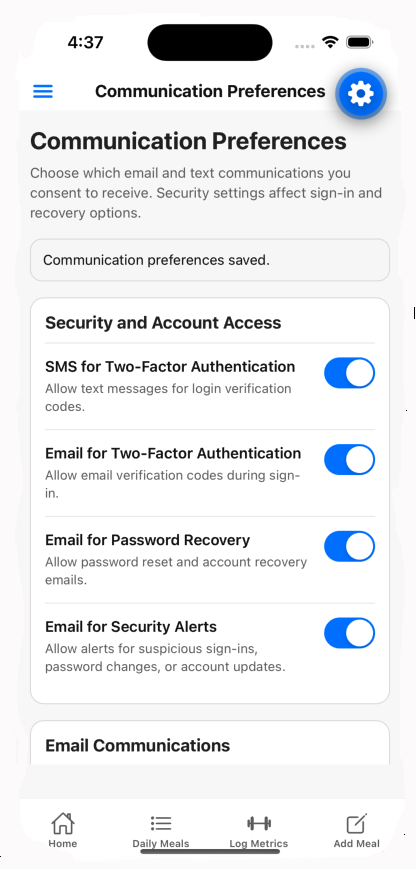
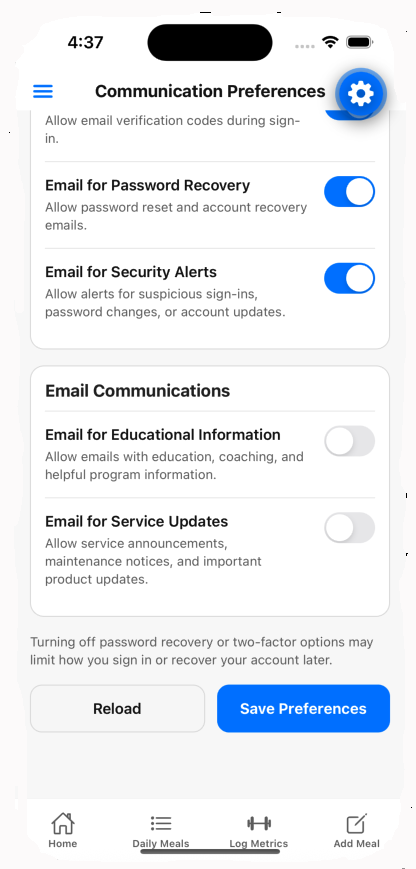
The Communication Preferences screen includes separate controls for these categories:
- SMS for Two-Factor Authentication — verification codes for login and account access.
- Email for Password Recovery — password reset and recovery notices.
- Email for Educational Information — app education, coaching, and program information.
- Email for Two-Factor Authentication — verification codes delivered by email.
- Email for Security Alerts — suspicious login alerts and account security notices.
- Email for Service Updates — important service and product notices.
How users opt in
- The user signs in to the PSMF Pro app.
- The user opens the menu and navigates to Maintenance → Communication Preferences.
- The user reviews each communication category separately.
- The user manually enables the desired preference, such as SMS for Two-Factor Authentication.
- The user taps Save Preferences to store the updated setting.
SMS consent disclosure: By enabling SMS for two-factor authentication, the user consents to receive account verification text messages at the mobile number associated with their account. Frequency varies by account activity. Message and data rates may apply. Reply STOP to opt out. Reply HELP for help.
Communication Preferences screen examples
The screenshots below show the in-app Communication Preferences page that the user reviews before saving their choices.
SMS program details
- Program name: PSMF Pro account security messaging.
- Use case: account verification and security-related access messages.
- Audience: users who explicitly enable SMS two-factor authentication in the app.
- Frequency: recurring messages are not sent on a fixed schedule; messages are triggered by login, verification, or recovery activity.
- Opt-out: users may reply STOP to stop SMS messages.
- Help: users may reply HELP for help.
- Rates: message and data rates may apply depending on the user’s mobile plan.
Privacy statement for messaging consent
PSMF Pro uses communication preference data only to manage the user’s selected communication channels and deliver requested account-related messages.
SMS opt-in data and consent will not be shared with third parties or affiliates for marketing purposes.
Phone numbers and communication preferences are used to support requested app communications, such as authentication, recovery, security notices, and service operations, consistent with the user’s saved settings.
Business and support information
Replace the bracketed placeholders below with your final business contact information before publishing.
- Business name: PSMF Pro
- Website: https://pmsf-pro.com
- Support email: support@pmsf-pro.com
Read our Privacy Policy.